# SLES VM Image Networking issue
**URL:** https://forums.suse.com/t/sles-vm-image-networking-issue/27163
**Category:** SLES Networking
**Created:** [June 17, 2015, 9:27am UTC](https://forums.suse.com/t/sles-vm-image-networking-issue/27163 "2015-06-17T09:27:28Z")
**Posts on this page:** 8
**Page:** 1
### Author:  [@mosinshaikh](https://forums.suse.com/u/mosinshaikh)
#### Post date: [June 17, 2015, 9:27am UTC](https://forums.suse.com/t/sles-vm-image-networking-issue/27163/1 "2015-06-17T09:27:28Z")
Hi All,
Actually we have one EMC product called EMC Asset management and planning(AMP), It is a VM Image and its host OS is SUSE Linux Enterprise server, now I have done all the network setting that is available through YaST ,like static IP,DNS host, Default gateway, but I am not able to access that VM on the network (not able to ping it), and there is no problem with the network, it is able to ping it self.
Please tell me Is there any other setting I need to do in order to make it available on the network or what can be the problem I am facing.
help appreciated.
Regards.
---
### Author:  [@malcolmlewis](https://forums.suse.com/u/malcolmlewis)
#### Post date: [June 17, 2015, 4:22pm UTC](https://forums.suse.com/t/sles-vm-image-networking-issue/27163/2 "2015-06-17T16:22:59Z")
> [@](#):
>
> On Wed 17 Jun 2015 06:34:01 AM CDT, mosinshaikh wrote:
>
> Hi All,
>
> Actually we have one EMC product called EMC Asset management and
> planning(AMP), It is a VM Image and its host OS is SUSE Linux Enterprise
> server, now I have done all the network setting that is available
> through YaST ,like static IP,DNS host, Default gateway, but I am not
> able to access that VM on the network (not able to ping it), and there
> is no problem with the network, it is able to ping it self.
> Please tell me Is there any other setting I need to do in order to make
> it available on the network or what can be the problem I am facing.
>
> help appreciated.
>
> Regards.
Hi
So how are you connecting from the VM to the host network, NAT, a
bridge to a physical interface?
–
Cheers Malcolm °¿° LFCS, SUSE Knowledge Partner (Linux Counter #276890)
SUSE Linux Enterprise Desktop 12 GNOME 3.10.1 Kernel 3.12.39-47-default
If you find this post helpful and are logged into the web interface,
please show your appreciation and click on the star below… Thanks!
---
### Author:  [@mosinshaikh](https://forums.suse.com/u/mosinshaikh)
#### Post date: [June 18, 2015, 8:16am UTC](https://forums.suse.com/t/sles-vm-image-networking-issue/27163/3 "2015-06-18T08:16:49Z")
[QUOTE=malcolmlewis;28428]Hi
So how are you connecting from the VM to the host network, NAT, a
bridge to a physical interface?
–
Cheers Malcolm °¿° LFCS, SUSE Knowledge Partner (Linux Counter #276890)
SUSE Linux Enterprise Desktop 12 GNOME 3.10.1 Kernel 3.12.39-47-default
If you find this post helpful and are logged into the web interface,
please show your appreciation and click on the star below… Thanks![/QUOTE]
Hi malcolmlewis, Thanks for the reply,
I am connecting the VM Through Bridge to the physical interface.
---
### Author:  [@malcolmlewis](https://forums.suse.com/u/malcolmlewis)
#### Post date: [June 18, 2015, 5:51pm UTC](https://forums.suse.com/t/sles-vm-image-networking-issue/27163/4 "2015-06-18T17:51:49Z")
> [@](#):
>
> On Thu 18 Jun 2015 05:24:01 AM CDT, mosinshaikh wrote:
>
> malcolmlewis;28428 Wrote:[color=blue]
>
> > Hi
> > So how are you connecting from the VM to the host network, NAT, a
> > bridge to a physical interface?
> >
> > –
> > Cheers Malcolm °¿° LFCS, SUSE Knowledge Partner (Linux Counter
> > #276890)
> > SUSE Linux Enterprise Desktop 12 GNOME 3.10.1 Kernel
> > 3.12.39-47-default If you find this post helpful and are logged into
> > the web interface, please show your appreciation and click on the
> > star below… Thanks![/color]
>
> Hi malcolmlewis, Thanks for the reply,
> I am connecting the VM Through Bridge to the physical interface.
Hi
So if using virt-manager you can specify that it’s using brX (where X
is your bridge number) and select the virtio device not an e1000 and
should work fine.
I’m assuming you have also used either YaST network settings to create
the bridge from the physical interface, or brctl from the command line?
–
Cheers Malcolm °¿° LFCS, SUSE Knowledge Partner (Linux Counter #276890)
SUSE Linux Enterprise Desktop 12 GNOME 3.10.1 Kernel
3.12.43-52.6-default If you find this post helpful and are logged into
the web interface, please show your appreciation and click on the star
below… Thanks!
---
### Author:  [@mosinshaikh](https://forums.suse.com/u/mosinshaikh)
#### Post date: [June 23, 2015, 1:12pm UTC](https://forums.suse.com/t/sles-vm-image-networking-issue/27163/5 "2015-06-23T13:12:03Z")
[QUOTE=malcolmlewis;28444]Hi
So if using virt-manager you can specify that it’s using brX (where X
is your bridge number) and select the virtio device not an e1000 and
should work fine.
I’m assuming you have also used either YaST network settings to create
the bridge from the physical interface, or brctl from the command line?
–
Cheers Malcolm °¿° LFCS, SUSE Knowledge Partner (Linux Counter #276890)
SUSE Linux Enterprise Desktop 12 GNOME 3.10.1 Kernel
3.12.43-52.6-default If you find this post helpful and are logged into
the web interface, please show your appreciation and click on the star
below… Thanks![/QUOTE]
hi malcolm, thanks for the reply,
yes i have used YaST to configure all the network settings like assigning IP, configure DNS, setting default gateway.
and i am not aware of what you are saying virt-manager so can’t say.
Regards.
---
### Author:  [@malcolmlewis](https://forums.suse.com/u/malcolmlewis)
#### Post date: [June 23, 2015, 6:07pm UTC](https://forums.suse.com/t/sles-vm-image-networking-issue/27163/6 "2015-06-23T18:07:23Z")
Hi
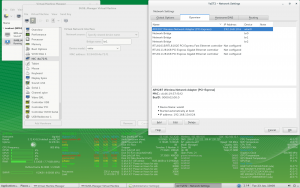
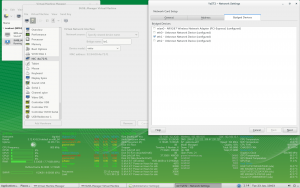
So on the host system via YaST Network Device → Network Settings, you configure the bridges, then in virt-manager you assign those to the host bridge.
[](http://www.imagebam.com/image/60409a417497852)
[](http://www.imagebam.com/image/7eb14d417497854)
Then in the VM you configure the network interfaces as per your os and requirements.
---
### Author:  [@mosinshaikh](https://forums.suse.com/u/mosinshaikh)
#### Post date: [June 24, 2015, 10:06am UTC](https://forums.suse.com/t/sles-vm-image-networking-issue/27163/7 "2015-06-24T10:06:27Z")
[QUOTE=malcolmlewis;28503]Hi
So on the host system via YaST Network Device → Network Settings, you configure the bridges, then in virt-manager you assign those to the host bridge.
[](http://www.imagebam.com/image/60409a417497852)
[](http://www.imagebam.com/image/7eb14d417497854)
Then in the VM you configure the network interfaces as per your os and requirements.[/QUOTE]
hi malcolmewis , thanks for the reply,
I think there is some misunderstanding. actually the host machine is a windows server8 machine and on that I have hosted a VM image with SLES OS in it.
now I have done YaST Network Device → Network Settings, please find attached images, it shows the network setting I did.
please let me know, if you found any thing helpful.
Regards
---
### Author:  [@Jens-U](https://forums.suse.com/u/Jens-U)
#### Post date: [June 25, 2015, 4:45pm UTC](https://forums.suse.com/t/sles-vm-image-networking-issue/27163/8 "2015-06-25T16:45:35Z")
Hi mosinshaikh,
I seem to be unable to access the attachments - could you please c&p (inside code blocks, use the “#” button of the web-based forum editor or add [C O D E] - [/ C O D E] around the pasted blocks) the output of “ip addr list; ip route list” from within the VM, run as user root?
Do you have other VMs on that MS Windows host that are connecting via bridged networking ? Are these on the same IP subnet as the VM in question?
Also, you might want to run “tcpdump -nvv” inside the VM to see if any incoming traffic shows up on the network interface at all. If so, it could help to see that output, too (at least for 5 or 10 traced packets).
Regards,
Jens