Hi Mike
Excellent stuff Although should have picked up on the old release
repositories still present earlier
Now you need to consider your update path to SP2, think there is only a
few months left for SP1…
For that you can use the YaST Service Pack Migration and the dry run to
see what will happen…
–
Cheers Malcolm °¿° SUSE Knowledge Partner (Linux Counter #276890)
openSUSE Leap 42.1|GNOME 3.16.2|4.1.36-44-default
If you find this post helpful and are logged into the web interface,
please show your appreciation and click on the star below… Thanks!
Greetings Malcolm, good morning. I am not quite sure what you mean by “should have picked up on the old release repositories still present earlier”? Is this the output from the command: “zypper lu -t patch”? I executed this command and it looks clean. However when I execute the command: “zypper dup --from SLES12SP1Update” the output wants me to downgrade three (3) packages. Now sure what to do and why! Is there other commands that I should execute to evaluate the status of this system?
[CODE]linux140:~ # zypper lu -t patch
Loading repository data…
Reading installed packages…
No updates found.
linux140:~ # zypper dup --from SLES12SP1Update
Loading repository data…
Reading installed packages…
Computing distribution upgrade…
The following 3 packages are going to be downgraded:
libldb1 libldb1-32bit zypper-migration-plugin
3 packages to downgrade.
Overall download size: 214.0 KiB. Already cached: 0 B. No additional space will be used or freed after the operation.
Continue? [y/n/? shows all options] (y): n[/CODE]
Hi
The fact that you had the old release repos active
You should only need to use zypper up now that things have been cleaned
up, the dup was only to get things switched that needed to be to the
new repos.
–
Cheers Malcolm °¿° SUSE Knowledge Partner (Linux Counter #276890)
openSUSE Leap 42.1|GNOME 3.16.2|4.1.36-44-default
If you find this post helpful and are logged into the web interface,
please show your appreciation and click on the star below… Thanks!
Greetings Malcolm, I still have a question about the output from the command: “zypper lu -t patch”. This command asks to downgrade three (3) packages. What reasons would there be for the downgrade. A bad upgrade maybe that has been pulled? Should I downgrade these three (3) packages?
Hi
Run zypper if on each package name, I suspect they are from the non SP1 repo (and probably different version numbering) hence the downgrade is just to get them to the SP1 versions.
Greetings Malcolm, thank you very much for the explanation. Took a bit of investigation to check the rpms on each of the repositories and verify that your explanation spot on! You have been a great help! Have a great day!
I’m also facing a similar issue in my SLES 15 SP4:
Problem: 1: the installed python311-dbm-3.11.13-150400.9.60.1.x86_64 requires 'python311 = 3.11.13', but this requirement cannot be provided
not installable providers: python311-3.11.13-150400.9.60.1.x86_64[Public_Cloud_Module_x86_64:SLE-Module-Public-Cloud15-SP4-Updates]
python311-3.11.13-150400.9.63.1.x86_64[Public_Cloud_Module_x86_64:SLE-Module-Public-Cloud15-SP4-Updates]
python311-3.11.13-150400.9.60.1.x86_64[SUSE_Linux_Enterprise_Server_for_SAP_Applications_x86_64:SLE-Product-SLES_SAP15-SP4-Updates]

Solution 1: Following actions will be done: deinstallation of python311-dbm-3.11.13-150400.9.60.1.x86_64 deinstallation of python311-curses-3.11.13-150400.9.60.1.x86_64

Solution 2: do not install patch:SUSE-SLE-Module-Public-Cloud-15-SP4-2025-4257-1.noarch

Solution 3: break python311-dbm-3.11.13-150400.9.60.1.x86_64 by ignoring some of its dependencies
So looks like you have python311-dbm-3.11.13-150400.9.60 installed? It’s wanting to upgrade to python311-3.11.13-150400.9.63 so there is no python311-dbm-3.11.13-150400.9.63 available?
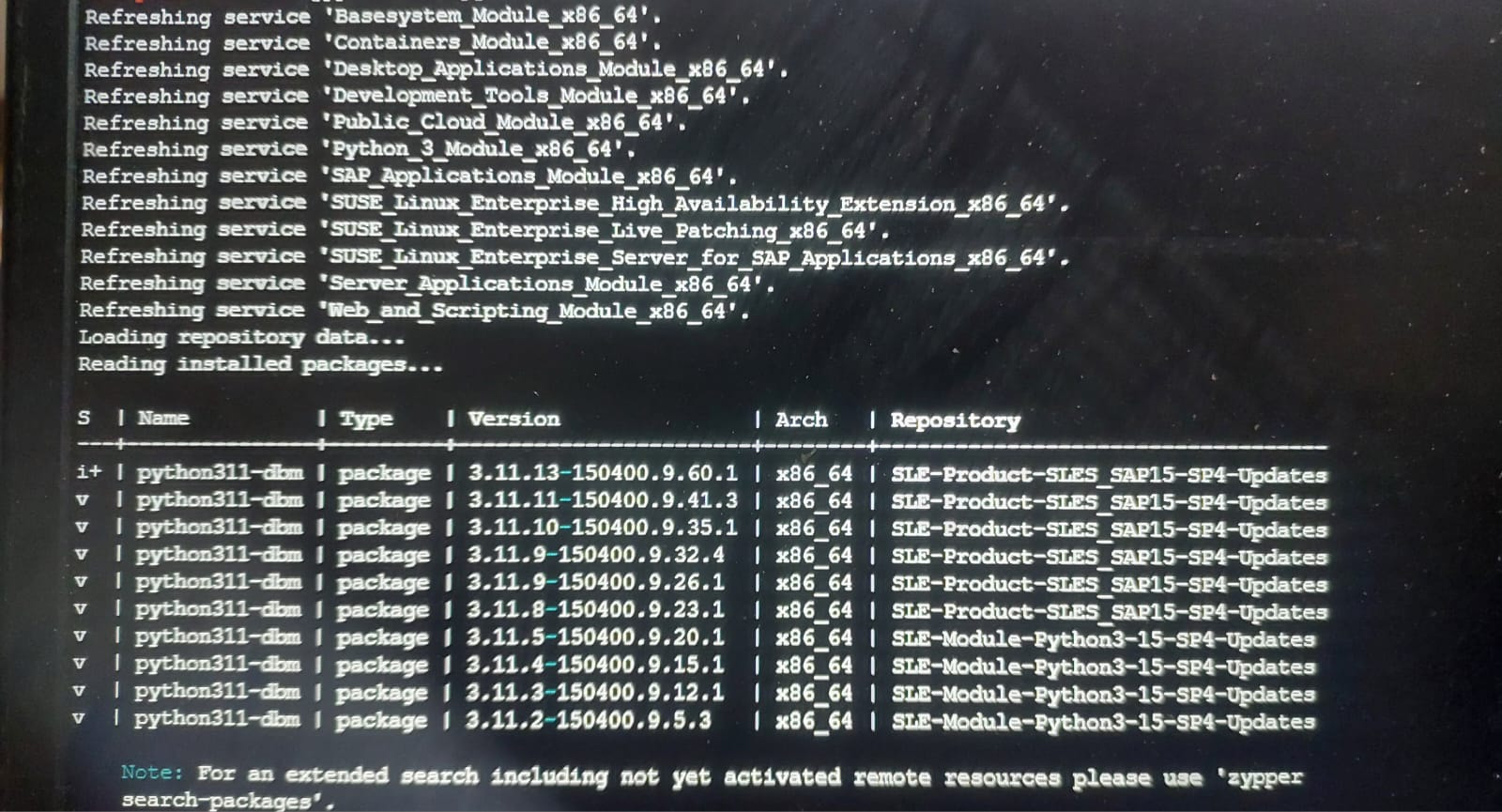
Run zypper se -s python311-dbm should show all versions and repositories they are from.
Refreshing service ‘Basesystem_Module_x86_64’. Refreshing service ‘Containers_Module_x86_64’. Refreshing service ‘Desktop_Applications_Module_x86_64’. Refreshing service ‘Development_Tools_Module_x86_64’. Refreshing service ‘Public_Cloud_Module_x86_64’. Refreshing service ‘Python_3_Module_x86_64’. Refreshing service ‘SAP_Applications_Module_x86_64’. Refreshing service ‘SUSE_Linux_Enterprise_High_Availability_Extension_x86_64’. Refreshing service ‘SUSE_Linux_Enterprise_Live_Patching_x86_64’. Refreshing service ‘SUSE_Linux_Enterprise_Server_for_SAP_Applications_x86_64’. Refreshing service ‘Server_Applications_Module_x86_64’. Refreshing service ‘Web_and_Scripting_Module_x86_64’. Loading repository data… Reading installed packages…
S Name Type Version Arch Repository
i+ python311-dbm package 3.11.13-150400.9.60.1 x86_64 SLE-Product-SLES_SAP15-SP4-Updates
v python311-dbm package 3.11.11-150400.9.41.3 x86_64 SLE-Product-SLES_SAP15-SP4-Updates
v python311-dbm package 3.11.10-150400.9.35.1 x86_64 SLE-Product-SLES_SAP15-SP4-Updates
v python311-dbm package 3.11.9-150400.9.32.4 x86_64 SLE-Product-SLES_SAP15-SP4-Updates
v python311-dbm package 3.11.9-150400.9.26.1 x86_64 SLE-Product-SLES_SAP15-SP4-Updates
v python311-dbm package 3.11.8-150400.9.23.1 x86_64 SLE-Product-SLES_SAP15-SP4-Updates
v python311-dbm package 3.11.5-150400.9.20.1 x86_64 SLE-Module-Python3-15-SP4-Updates
v python311-dbm package 3.11.4-150400.9.15.1 x86_64 SLE-Module-Python3-15-SP4-Updates
v python311-dbm package 3.11.3-150400.9.12.1 x86_64 SLE-Module-Python3-15-SP4-Updates
v python311-dbm package 3.11.2-150400.9.5.3 x86_64 SLE-Module-Python3-15-SP4-Updates
I think it is trying to upgrade to python311-dbm-3.11.14-150400.9.69.1 but I’m not really sure. I found this page regarding the latest security update. It is telling that SUSE Linux Enterprise Server for SAP Applications 15 SP4 is affected by this security update but only “openSuse” and “Public Cloud Module 15-SP4” have these updates. And looking at the modules enabled in my system I can only find the “Public_Cloud_Module_x86_64”. Am I on the right track?
I have one more query as well:
If my understanding is right and I don’t have the right modules enabled, then why even is zypper trying to update python311? Does it upgrade all the package whose updates are available no matter which modules enabled in the system?
@kchetan008 I suspect you have some python stuff installed from the public cloud module, hence the issue.
I would use zypper (or YaST) to peruse what files are installed from the Public Coud repository. With zypper you can use the -r option to specify the repo # or Alias for zypper lr
I have identified the problem now. The problem was that python311-dbm’s latest version was required by 2 other packages. But it was not yet released for SLES 15 SP4.
The new update have recently been published for 15 SP4:
Now my problem has been resolved.
In conclusion, it was just a dependency issue where the latest version of dependency was not yet released.
 Although should have picked up on the old release