I have installed rancher UI on a RKE2 three node HA cluster. I am trying to create another RKE 2 cluster through the UI. I have run the generated command on the new machine. However, the node is not being properly registered in Rancher.
I am also encountering an issue when registering an existing RKE2 cluster into the same rancher setup. The rke2 server service in the cluster is up and running.


What rancher version are you on? Did you by chance install rke2 before, uninstall and then re-run the install script?
Hi Meza
I am using Rancher v2.10.
Yes, I have tried uninstalling and installing. I have also tried both with TLS and without TLS.
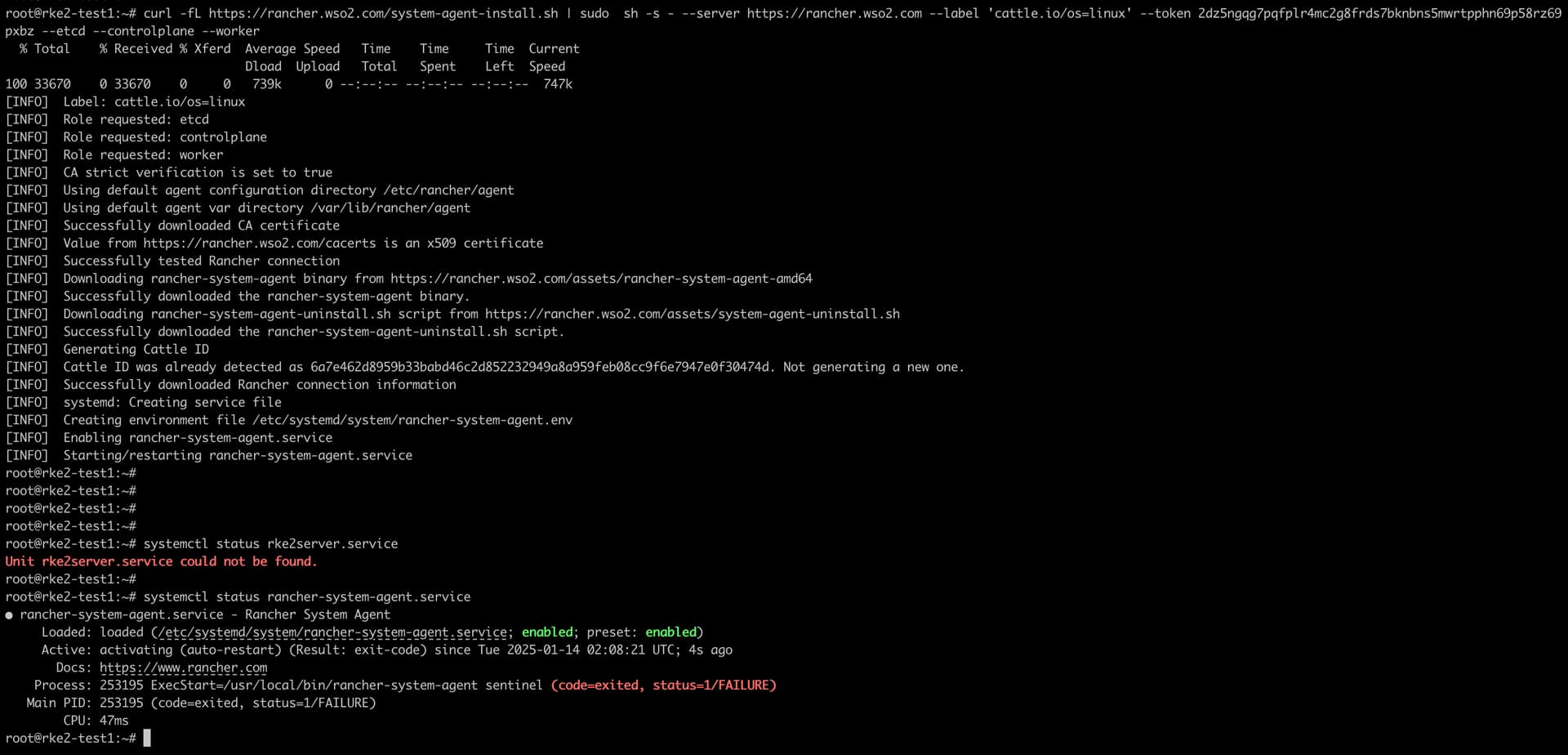
This is the terminal output when running the installation command. Rancher service is active. However, rke service is not installed correctly through the command.
root@rke2-test1:~# journalctl -u rancher-system-agent -f
Jan 14 02:12:12 rke2-test1 systemd[1]: rancher-system-agent.service: Main process exited, code=exited, status=1/FAILURE
Jan 14 02:12:12 rke2-test1 systemd[1]: rancher-system-agent.service: Failed with result ‘exit-code’.
Jan 14 02:12:17 rke2-test1 systemd[1]: rancher-system-agent.service: Scheduled restart job, restart counter is at 482719.
Jan 14 02:12:17 rke2-test1 systemd[1]: Started rancher-system-agent.service - Rancher System Agent.
Jan 14 02:12:17 rke2-test1 rancher-system-agent[253610]: time=“2025-01-14T02:12:17Z” level=info msg=“Rancher System Agent version v0.3.11 (b8c28d0) is starting”
Jan 14 02:12:17 rke2-test1 rancher-system-agent[253610]: time=“2025-01-14T02:12:17Z” level=info msg=“Using directory /var/lib/rancher/agent/work for work”
Jan 14 02:12:17 rke2-test1 rancher-system-agent[253610]: time=“2025-01-14T02:12:17Z” level=info msg=“Starting remote watch of plans”
Jan 14 02:12:17 rke2-test1 rancher-system-agent[253610]: time=“2025-01-14T02:12:17Z” level=fatal msg=“error while connecting to Kubernetes cluster: Get "https://rancher.wso2.com/version\”: tls: failed to verify certificate: x509: certificate signed by unknown authority"
This is the status when running in insecure state.

root@rke2-test1:~# journalctl -u rancher-system-agent -f
Jan 14 02:13:19 rke2-test1 systemd[1]: rancher-system-agent.service: Main process exited, code=exited, status=1/FAILURE
Jan 14 02:13:19 rke2-test1 systemd[1]: rancher-system-agent.service: Failed with result ‘exit-code’.
Jan 14 02:13:24 rke2-test1 systemd[1]: rancher-system-agent.service: Scheduled restart job, restart counter is at 482731.
Jan 14 02:13:24 rke2-test1 systemd[1]: Started rancher-system-agent.service - Rancher System Agent.
Jan 14 02:13:24 rke2-test1 rancher-system-agent[253930]: time=“2025-01-14T02:13:24Z” level=info msg=“Rancher System Agent version v0.3.11 (b8c28d0) is starting”
Jan 14 02:13:24 rke2-test1 rancher-system-agent[253930]: time=“2025-01-14T02:13:24Z” level=info msg=“Using directory /var/lib/rancher/agent/work for work”
Jan 14 02:13:24 rke2-test1 rancher-system-agent[253930]: time=“2025-01-14T02:13:24Z” level=info msg=“Starting remote watch of plans”
Jan 14 02:13:24 rke2-test1 rancher-system-agent[253930]: time=“2025-01-14T02:13:24Z” level=fatal msg=“error while connecting to Kubernetes cluster: Get "https://rancher.wso2.com/version\”: tls: failed to verify certificate: x509: certificate signed by unknown authority"
We’ve run into the exact same error, when trying to create a downstream cluster through the Rancher (2.10.3) UI.
Logs from rancher-system-agent on the downstream cluster nodes reveal a problem with the certificate verification.
Mar 05 16:37:56 node2 systemd[1]: Started rancher-system-agent.service - Rancher System Agent.
Mar 05 16:37:56 node2 rancher-system-agent[4532]: time="2025-03-05T16:37:56+01:00" level=info msg="Rancher System Agent version v0.3.11 (b8c28d0) is starting"
Mar 05 16:37:56 node2 rancher-system-agent[4532]: time="2025-03-05T16:37:56+01:00" level=info msg="Using directory /var/lib/rancher/agent/work for work"
Mar 05 16:37:56 node2 rancher-system-agent[4532]: time="2025-03-05T16:37:56+01:00" level=info msg="Starting remote watch of plans"
Mar 05 16:37:56 node2 rancher-system-agent[4532]: time="2025-03-05T16:37:56+01:00" level=fatal msg="error while connecting to Kubernetes cluster: Get \"https://myrancher.example.com/version\": tls: failed to verify certificate: x509: certificate signed by unknown authority"
Mar 05 16:37:56 node2 systemd[1]: rancher-system-agent.service: Main process exited, code=exited, status=1/FAILURE
Mar 05 16:37:56 node2 systemd[1]: rancher-system-agent.service: Failed with result 'exit-code'.
https://myrancher.example.com obviously points to a load balancer (with a valid TLS certificate!) and behind it the nodes of a RKE2 cluster where Rancher is deployed.
Inside Rancher itself, the rancher pods (in cattle-system) show the following error:
ck@admin:~$ kubectl -n cattle-system logs rancher-6ff9d5cbd-plrpp -f
2025/03/05 16:05:27 [INFO] [planner] rkecluster fleet-default/vp-prod: configuring bootstrap node(s) custom-58226c19061a: waiting for agent to check in and apply initial plan
2025/03/05 16:05:27 [ERROR] error syncing 'c-m-tpvvljcr': handler cluster-deploy: cluster context c-m-tpvvljcr is unavailable, requeuing
2025/03/05 16:06:58 [ERROR] error syncing '_all_': handler user-controllers-controller: userControllersController: failed to set peers for key _all_: failed to start user controllers for cluster c-m-tpvvljcr: ClusterUnavailable 503: cluster not found, requeuing
This is a brand-new setup, no Rancher or Kubernetes cluster updates.
Hello, I’m facing exactly the same problem. Did you manage to solve it? How did you solve it?
I ran into this problem and resolved this by changing the agent-tls-mode from strict to system-store.
From the docs:
In
strictmode the agents (system, cluster, fleet, etc) will only trust Rancher installations which are using a certificate signed by the CABundle in thecacertssetting. When the mode is system-store, the agents will trust any certificate signed by a CABundle in the operating system’s trust store.
I suspect that because we have Cloudflare doing TLS termination, the certificate that agents are seeing no longer matches the certificate when getting the certificate from /cacerts.