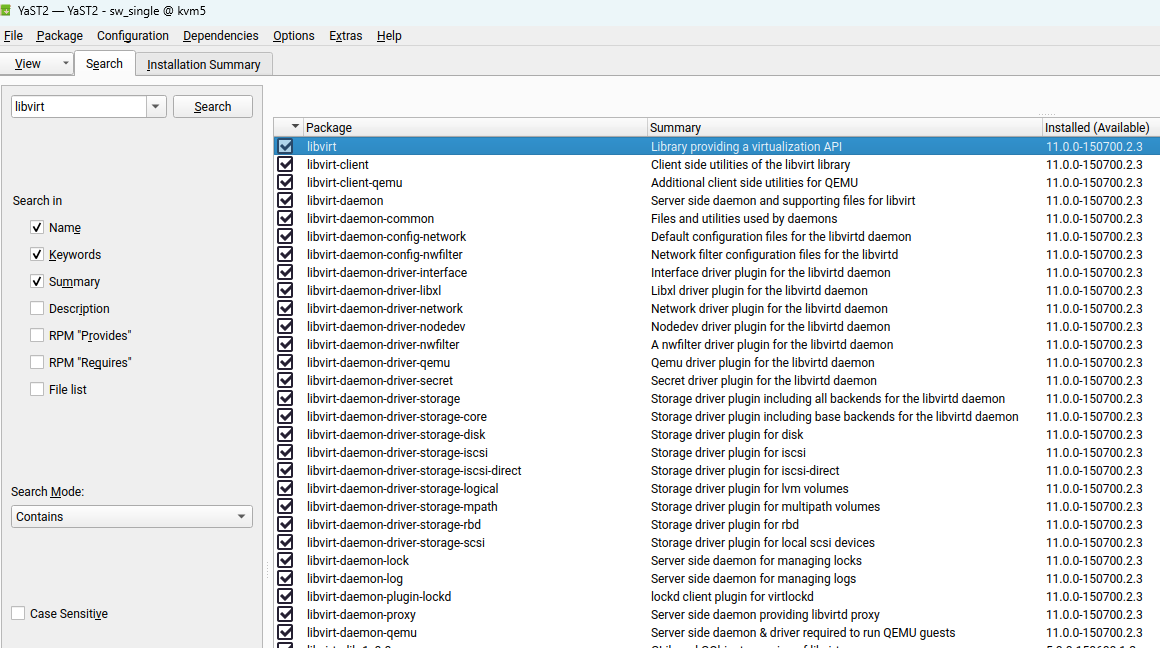
Although KVM is already installed libvirt and libvirt_client are not loaded.
I saw that they were not installed, so I did it and put it to load automatically with systemctl enable –now libvirtd.service, so I checked an they were running fine.
So I rebooted the server and they were not running, so my questions are:
1- Why this SUSE version SLES15SP7 does not install them when you trigger KVM installation using yast2 virtualization?
2- Why after installing and setting it to enable, they do not start automatically?
By the way is the same behavior for sles15sp7qu1
No ideas?
Is there somebody using KVM with SUSE15SP6 or SP7 and having the same problem that I have?
Why this modules loaded from a SUSE repository cannot start automatically?
20 days, no answers at all
@JOSE_CALIL Did you select “Start virtual machine on host boot up”?
The libvirtd service doesn’t need to be enabled either…
I assume you have looked here https://documentation.suse.com/en-us/sles/15-SP7/html/SLES-all/book-virtualization.html?
Yes it starts, but I need libvirtd and virtlib-guests (libvirt-client), to make my BACKUP software to do KVM VM hot backups. Otherwise, it will not do backups nor restores
And by the way, thanks for answering me. Anyway, even if you install and enable those demons they will not start at the next boot, I can´t find the reason. There is no posts available about this issue
What I could see is that SUSE SLES iso install bellow 16GB in size works fine, I mean this problem does not exist (SUSE SLES15SP-QU1 is ok, it is about 14GB). After this version, the iso program is about 20GB in size and after this change, the problem appears.
@JOSE_CALIL AFAIK it’s the change in systemd, you would likely need to craft a systemd service for your (I’m assuming virsh) requirements.
Malcom:
Sorry for my delay on answering your proposal, but I had some servers crashed around me and I was very focused trying to solve those problems
Getting back, I am not that expert as you are, from your statement I understood that SYSTEMD has changed (AFAIK is a codename?) and that I need to “craft a systemd service for your (I’m assuming virsh) requirements.”, what you mean with that?
Is there any documentation? Any help? I am not aware of this process.
@JOSE_CALIL I meant changes to how systemd operates with respect to the likes of libvirtd etc.
So what command(s) are run to manually start those services you need?
So far I notice that libvirtd and libvirt-client (that I guess it is libvirt-guests, but it is shown and libvirt-client and libvirt-client-qemu, that is installed and loaded with libvirt-client
kvm5:~ # systemctl status libvirtd.service
○ libvirtd.service - libvirt legacy monolithic daemon
 Loaded: loaded (/usr/lib/systemd/system/libvirtd.service; enabled; preset: disabled)

 Active: inactive (dead)
TriggeredBy: ○ libvirtd.socket
○ libvirtd-ro.socke
○ libvirtd-admin.socke
Docs: man:libvirtd(8)
https://libvirt.org/
kvm5:~ # systemctl status libvirt-guests.service
○ libvirt-guests.service - libvirt guests suspend/resume service
Loaded: loaded (/usr/lib/systemd/system/libvirt-guests.service; disabled; >
Active: inactive (dead)
Docs: man:libvirt-guests(8)
https://libvirt.org/
You can see that are enabled but not running, you have to start it mannualy always after a reboot
That makes sens?
Calil
So far I notice that libvirtd and libvirt-client (that I guess it is libvirt-guests, but it is shown and libvirt-client and libvirt-client-qemu, that is installed and loaded with libvirt-client
kvm5:~ # systemctl status libvirtd.service
○ libvirtd.service - libvirt legacy monolithic daemon
Loaded: loaded (/usr/lib/systemd/system/libvirtd.service; enabled; preset: disabled)
Active: inactive (dead)
TriggeredBy: ○ libvirtd.socket
○ libvirtd-ro.socke
○ libvirtd-admin.socke
   Docs: man:libvirtd(8)

         [https://libvirt.org/](https://libvirt.org/)
kvm5:~ # systemctl status libvirt-guests.service
○ libvirt-guests.service - libvirt guests suspend/resume service
 Loaded: loaded (/usr/lib/systemd/system/libvirt-guests.service; disabled; >

 Active: inactive (dead)

   Docs: man:libvirt-guests(8)

         [https://libvirt.org/](https://libvirt.org/)
You can see that are enabled but not running, you have to start it mannualy always after a reboot
That makes sens?
Calil
@JOSE_CALIL some services run then stop because they have done their job? So what to the logs say about those services?
Do you have a /etc/sysconfig/libvirt-guests file?
I’d suggest a read of the man page man 8 libvirt-guests as it has info on resuming guests.