License expired, but cant register new license

Hello,

Our license expired, so we bought a new one.

When we try to register the new license, it says that PackageKit is running, so it cant communicate with scc.

Is there something we can do to enter the new registration information?

We have tried forcing the registration, adding the -r -e to SUSEConnect to no avail. It’s as if something is blocking internet access.

Any help is appreciated.

TIA.

Hello X,

First check whether you have registered SUSE with the below command:

suse SUSEConnect -s

If the result displays Not Registered, then enter the following command to register.

rm /etc/SUSEConnect
rm -f /etc/zypp/{repos,services,credentials}.d/*
rm -f /usr/lib/zypp/plugins/services/*
sed -i ‘/^# Added by SMT reg/,+1d’ /etc/hosts
/usr/sbin/registercloudguest --force-new

Regards,

Yuvan

Hello Yuvan,

Thank you for the email.

I ran all commands until sed…

But once I run the last command it says it can’t be found.

What else can we do?

Best,

I’m not sure where Yuvan got those instructions from but registercloudguest (as the name suggests) isn’t a general command available on all instances of SUSE Linux Enterprise.

Which version of SLES are you using?

What does SUSEConnect --status-text now report?

Hello Simon,

We are on SUSE Linux Enterprise Server 15 SP5.

SUSEConnect unfortunately due to the previous commands is removed.

How can we add it back?

Thank you,

Hi Smflood,

My bad though the user X was trying from a cloud environment.

@XcacaX Can you perform the below command

sudo zypper clean -a

And specify the product explicitly by the below command.

sudo SUSEConnect -p SLES/15.5/x86_64 -r -e

Kindly paste the exact error message you are getting in case if it dint work.

Peace

Yuva,

SUSEConnect was not found.

Please see attached screenshot.

I think we need to reinstall SUSEConnect.

Yes, Please try the below command and repeat the above registration.

sudo zypper install SUSEConnect

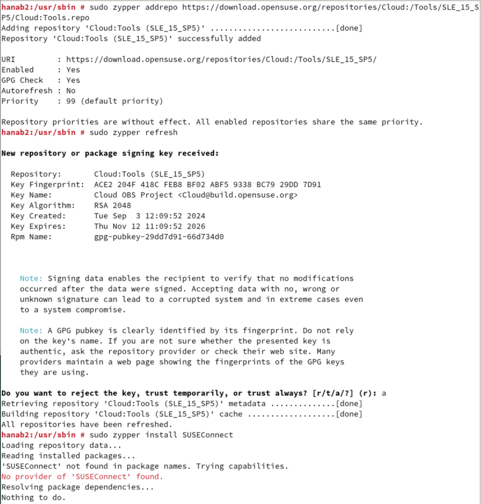
Tried that, this is what I get.

You need to add repository and try installing

sudo zypper addrepo https://download.opensuse.org/repositories/Cloud:/Tools/SLE_15_SP5/Cloud:Tools.repo
sudo zypper refresh

sudo zypper install SUSEConnect

sudo SUSEConnect -p SLES/15.5/x86_64 -r -e

Almos, but I don’t think that one has SUSEConnect

Everything else worked.

Can you please add these repositories and try as well ?

sudo zypper ar -f https://updates.suse.com/SUSE/Products/SLE-Product-SLES/15-SP5/x86_64/product/ SLES15-SP5-Product
sudo zypper ar -f https://updates.suse.com/SUSE/Updates/SLE-Product-SLES/15-SP5/x86_64/update/ SLES15-SP5-Updates
sudo zypper ar -f https://updates.suse.com/SUSE/Updates/SLE-Module-Basesystem/15-SP5/x86_64/update/ SLE-Module-Basesystem15-SP5-Updates
sudo zypper refresh

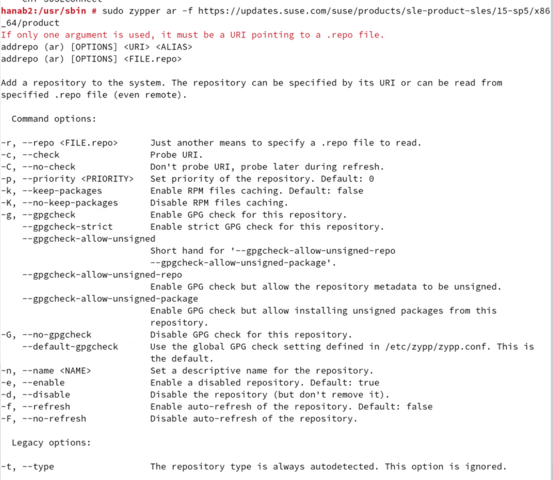
Im getting this for output.

The -r option to zypper expects a .repo file which is not part of the suggested URL.

However if the server is not registered then I would not expect it to be able to access SUSE’s update repositories.

Is the SUSEConnect utility really missing? What does rpm -qa suseconnect* report?

If it doesn’t output anything I’d suggest grabbing the latest version of the suseconnect-ng package from https://scc.suse.com/patches/ - search for suseconnect in Product “Basesystem Module”, Version “15 SP5”, Arch as appropriate - and installing that.

It did not report anything.

Just went to the next line.

Can you provide command lines to do this?

Maybe try:

download the OpenSUSE Leap 15.6 version of susconnect-ng package at the link below:

https://software.opensuse.org/package/suseconnect-ng

That package should install on SLES 15 SP5 using the command below:

rpm -ivh suseconnect-ng

Once it is installed, they should be able to run the command below to register the system:

SUSEConnect -r

NO, do NOT use an openSUSE version of a package on SUSE Linux Enterprise.

If the rpm -qa suseconnect* command didn’t report anything then it means a suseconnect* package is not installed.

Do you have access to the media or an ISO (the Full version) of SLES15 SP5 matching the architecture you have? If so, you should be able to mount that to/on your machine and rpm -Uvh the required package(s) as you’ll likely need more than just suseconnect-ng.

How would it work if I have the image mounted as an ISO from VMWare.

What would I need to type to mount the image and then the rpm -Uvh?

Best,